This is my second post on creating DVD video, on the first one I used a program called DeVeDe. Now I want to do the same using another program called manDVD. This was recommended by an anonymous comment on the other post. I really like manDVD, the step by step process makes converting to DVD video very simple. It also lets you create really nice looking menu's for your DVD. To get a hold of the program check the links at the end.
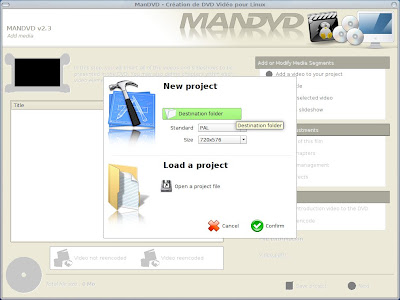
When you run the program you'll be presented with the following window. You can start a new project or load an existing one.To start a new project, first select the destination folder and then choose the standard and size of your final DVD video. Click 'Confirm' to get to step two.
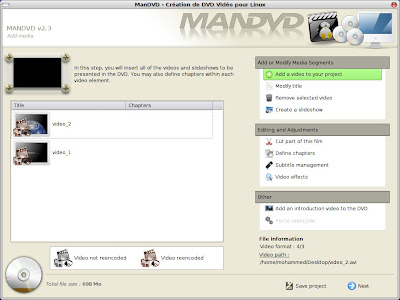
Next, start adding your video files. Once you've done that you can add subtitles, define the length of chapters or even add some nice video effects. I'm going to ignore all that and go straight to menu creation.
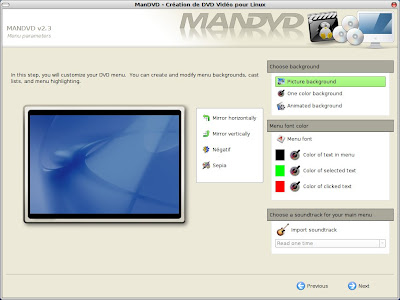
The first step for making a menu is choosing a background. Here I have chosen a picture. You can have an animated background created from the video if you want. Next click on the 'Menu font' button, choose an appropriate font and size. You can also have music playing in the menu background, which is nice.
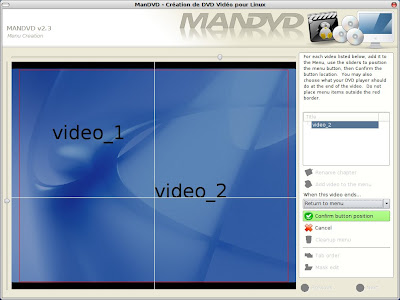
Next, we need to add the video buttons to the menu. Position the buttons using the sliders. Once your happy with the positions click 'Confirm button position'. Don't forget to choose whether you want it to go back to the menu or play the next video when one video ends. When your done, click 'Next' to go to the final window.
In this window click on the 'Options' button. From here you can set the video bitrate depending on whether you want good quality of a faster conversion. Once your done click the options button again to get rid of it.
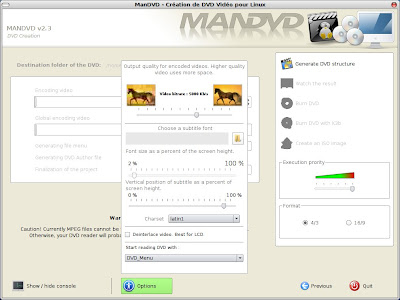
The last choice to make is whether you want 4/3 or 16/9 format. Then click 'Generate DVD structure' and wait for it to finish converting.
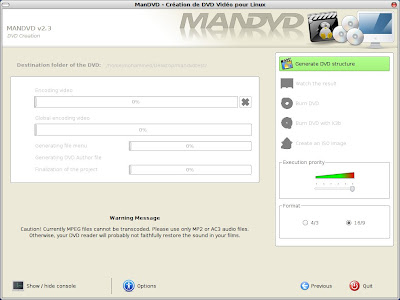
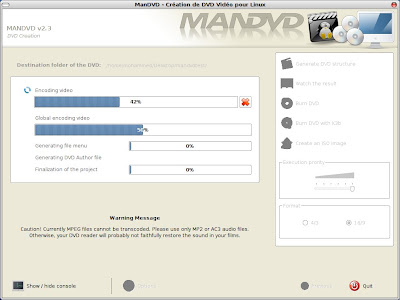
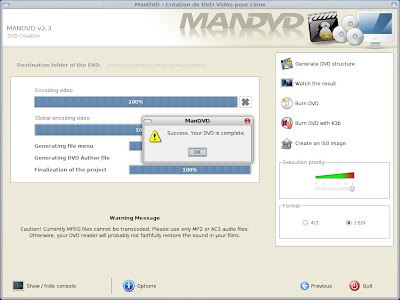
Once it's finished you can view the result, burn it to disk or create an ISO image. As you can see from the screenshots the program isn't fully translated into English, however this is not a huge problem and shouldn't prevent you from doing anything. ManDVd is now my preferred application for converting avi to DVD in Ubuntu. Thanks to the person who recommended this.
Links:
getdeb.net
Softpedia
When you run the program you'll be presented with the following window. You can start a new project or load an existing one.To start a new project, first select the destination folder and then choose the standard and size of your final DVD video. Click 'Confirm' to get to step two.

Next, start adding your video files. Once you've done that you can add subtitles, define the length of chapters or even add some nice video effects. I'm going to ignore all that and go straight to menu creation.

The first step for making a menu is choosing a background. Here I have chosen a picture. You can have an animated background created from the video if you want. Next click on the 'Menu font' button, choose an appropriate font and size. You can also have music playing in the menu background, which is nice.

Next, we need to add the video buttons to the menu. Position the buttons using the sliders. Once your happy with the positions click 'Confirm button position'. Don't forget to choose whether you want it to go back to the menu or play the next video when one video ends. When your done, click 'Next' to go to the final window.

In this window click on the 'Options' button. From here you can set the video bitrate depending on whether you want good quality of a faster conversion. Once your done click the options button again to get rid of it.

The last choice to make is whether you want 4/3 or 16/9 format. Then click 'Generate DVD structure' and wait for it to finish converting.


Once it's finished you can view the result, burn it to disk or create an ISO image. As you can see from the screenshots the program isn't fully translated into English, however this is not a huge problem and shouldn't prevent you from doing anything. ManDVd is now my preferred application for converting avi to DVD in Ubuntu. Thanks to the person who recommended this.

Links:
getdeb.net
Softpedia